
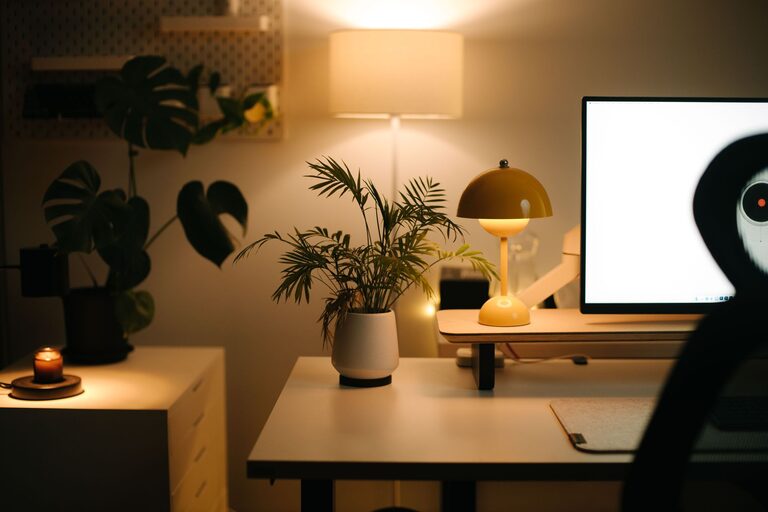
Creating a productive home workspace is essential for anyone working remotely or spending significant time on personal projects. A well-designed area can enhance focus, reduce distractions, and improve overall comfort, contributing to better work performance and well-being. In this post, we’ll explore actionable tips to help you set up a home workspace that supports your productivity and keeps you comfortable throughout the day.
Why a Dedicated Workspace Matters
Having a dedicated workspace at home signals to your brain that it’s time to work, which helps build a productive routine. It creates boundaries between your professional life and relaxation space, reducing the risk of distractions and burnout.
Choosing the Right Location
Find a Quiet Spot
Select a space in your home with minimal noise and foot traffic. This could be a spare room, a corner in your living room, or even a section of your bedroom. Reducing background noise lets you concentrate better, improving focus.
Consider Natural Light
Position your desk near a window if possible. Natural light boosts mood, reduces eye strain, and helps regulate your body clock. If natural light is limited, invest in good-quality task lighting with adjustable brightness and color temperature.
Ergonomics: Prioritize Your Comfort
Invest in a Comfortable Chair
Since you’ll be sitting for long periods, a chair with proper lumbar support and adjustable height is vital. It helps maintain good posture and decreases the risk of back pain.
Set Up Your Desk at the Right Height
Your desk should allow your arms to rest comfortably at a 90-degree angle. Your monitor should be at eye level to avoid neck strain. If necessary, use equipment like monitor stands or keyboard trays to achieve the right setup.
Use an Ergonomic Keyboard and Mouse
Splitting or curved keyboards and vertical mice can help reduce strain and prevent repetitive stress injuries. Choose devices that feel natural for your hand size and typing style.
Organizing Your Space for Efficiency
Keep Essentials Within Reach
Arrange frequently used items like notebooks, pens, or your phone within arm’s length. This minimizes interruptions and keeps you focused.
Declutter Regularly
A cluttered desk can distract and stress you out. Clean your workspace daily or weekly to maintain a neat environment. Use organizers, trays, and drawers to store supplies neatly.
Manage Cables
Tangled cables can look messy and cause frustration. Use cable organizers or clips to keep cords tidy and out of your way.
Minimize Distractions
Use Noise-Canceling Headphones
If noise is unavoidable, headphones can help isolate you from interruptions and improve concentration.
Set Boundaries
Communicate your work schedule to family or roommates to reduce disturbances. Use a visible sign or close your door to signal you’re busy.
Limit Digital Distractions
Turn off unnecessary notifications and consider apps that block distracting websites during work hours.
Personalize Your Environment
Add Plants
Plants improve air quality and create a calming atmosphere, which can enhance focus and reduce stress.
Choose Inspiring Decor
Incorporate artwork, photos, or motivational quotes that make you feel positive and motivated.
Control Temperature and Airflow
Make sure your workspace is well-ventilated and at a comfortable temperature to avoid discomfort that distracts you.
Incorporate Movement and Breaks
Use a Sit-Stand Desk
Alternating between sitting and standing encourages movement, improves circulation, and can boost energy.
Schedule Short Breaks
Take short breaks every hour to stretch or walk around. This helps prevent fatigue and maintains mental clarity.
Practice Eye Care
Follow the 20-20-20 rule: every 20 minutes, look at something 20 feet away for at least 20 seconds. This reduces eye strain from screens.
Optimize Technology and Tools
Reliable Internet Connection
A stable internet connection is critical for virtual meetings and fast access to resources.
Use Dual Monitors if Possible
Extra screen space can improve multitasking and make your workflow smoother.
Organize Digital Files
Keep your computer desktop and folders organized to quickly find the files you need.
Final Thoughts
Creating a productive home workspace involves a balance of comfort, organization, and focus-friendly design. Small changes like improving lighting, investing in ergonomic furniture, and reducing distractions can make a significant difference in your workday. Tailor your setup to your unique needs and preferences, and remember to maintain regular breaks for your wellbeing. With these tips, you can enjoy a home workspace that truly supports your best work.

Related Posts